Magento 2
What the module does
The Zaproo_Search module keeps one Zaproo index per Magento store view in sync with the catalog. It sends every enabled product that is visible in the catalog or in search, with its name, descriptions, URL, image, categories, prices, stock and the attributes your shop uses for search, filters and sorting. A configurable product is sent once, carrying the option values of its children, and its price is the cheapest child.
Changes reach Zaproo within about a minute. An admin save never waits on Zaproo: the module records what changed, and Magento's cron sends it.
The module covers indexing. Your storefront's search box keeps using Magento's own search until you point it at Zaproo with a search profile. See Integrate a storefront.
Requirements
- Magento 2.4.6 or later. The module is tested on 2.4.8-p5.
- PHP 8.1 or later.
- Multi-Source Inventory (MSI), which Magento enables by default.
- A running Magento cron. RabbitMQ is not needed.
Install
Prepare the cabinet
Create one index per store view, in that store view's language: open Indices in the project menu, click New index, enter a Name, pick the Language and click Create index. See Indices and languages. You don't need to add fields: the module adds them from your Magento attributes.
Then open API keys in the project menu and click New key. Enter a Name such as Magento, pick the Type Secret key (sk), server side and the Access Full access, and click Create key.
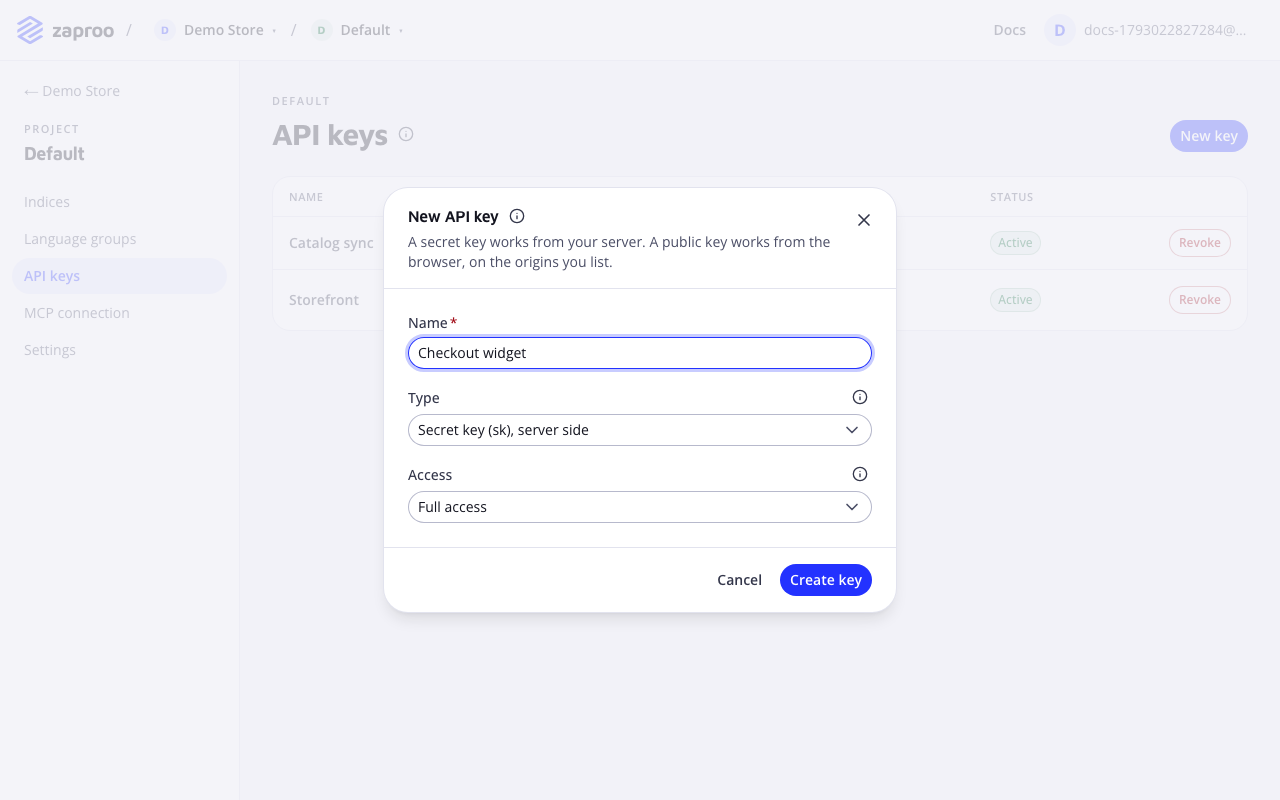
 A secret key with full access, for the module
Copy the key (zs_sk_…). You see it only once. Creating keys needs a verified email and the owner or admin role. See API keys.
The cabinet form has no field for an index scope. To keep the key away from other indices of the project, set its index scope to the store views' indices through the API.
Install the module
The module is a Composer package, zaproo/module-search. Your Zaproo contact gives you access to its Composer repository. Then, from the Magento root:
composer require zaproo/module-search
bin/magento module:enable Zaproo_Search
bin/magento setup:upgrade
bin/magento indexer:set-mode schedule zaproo_search_products
In production mode, also run bin/magento setup:di:compile and bin/magento setup:static-content:deploy, as for any module.
Connect the key
In the Magento admin, open Stores › Configuration › Catalog › Zaproo Search. With scope Default Config, paste the key into Secret API key and leave API URL as it is. Save. Project now lists the key's project with it selected. Save again.
Pick an index for each store view
Switch the scope to a store view. Set Sync this store view to Yes and choose its index under Index ID. The list shows the indices the key may use. Save, then repeat for every store view you want searchable. Each store view needs its own index.
Test and run the first sync
At each store view, click Test connection. It shows the index name, language and document count. Then, under Status, click Run full sync. Within a minute Indexed shows your product count and Last full sync shows the time.
Settings
All settings live under Stores › Configuration › Catalog › Zaproo Search. The defaults suit most shops.
| Setting | Scope | What it does |
|---|---|---|
| Sync this store view | Store view | Turns syncing on for this store view. |
| Index ID | Store view | The index this store view writes to. |
| Secret API key, Project | Default or website | The key is stored encrypted. Project is filled in from the key. |
| API URL | Default | Leave it as it is, unless you test against a Zaproo staging instance. Changing it rebuilds every store view's index there. |
| Batch size | Default | Products per request, 1 to 1000. The default is 500. |
| Max requests per minute | Default | The most write requests per store view per cron run. The default is 20. |
| Add new attributes to the Zaproo mapping | Default | Adds a field to the Zaproo mapping for each new attribute. Set it to No to manage every field yourself. |
| Index out-of-stock products | Default | Set it to No to keep sold-out products out of search. |
| Excluded attributes | Default | Attributes to leave out, even though they are searchable, filterable or used for sorting. |
Changing the excluded attributes, out-of-stock handling or the synced store views queues every product again. Products that didn't change are skipped. If you change these with bin/magento config:set, run bin/magento zaproo:search:requeue --all afterwards.
Fields and attributes
An attribute is sent when it is searchable, filterable or used for sorting. Its values are the store view's labels. It lands under attributes, for example attributes.color.
The first time an attribute is sent, the module adds its field to the mapping with settings taken from Magento:
| Attribute input | Zaproo field |
|---|---|
| Select, multiselect, swatch | keyword. Searchable if the attribute is searchable, filterable and facetable if it is filterable. |
| Text, textarea | text, or double for numeric text inputs. |
| Yes/No | boolean, filterable and facetable. |
| Price, weight | double. |
| Date | date. |
After that, the field is yours. Change its type or flags in Fields & mapping, for example make a size attribute a double to show it as a range slider. The module reads the mapping on every cron run and sends values in the type the field has now. A change that needs a reindex starts a full sync from Magento by itself on the next run.
While Add new attributes to the Zaproo mapping is Yes, you can't remove fields in the cabinet. To drop an attribute, add it to Excluded attributes, or turn the setting off.
Manage the sync
In Magento
The Status group on the settings page shows, per store view, the queued and failed products, the last full sync and any problem with what to do about it. Run full sync rebuilds the store view's index from scratch and swaps it in without downtime. A problem that needs you also shows at the top of every admin page.
In the cabinet
The index's Overview shows an Integration panel: Connected names the store view, and Platform shows Magento 2 with the module version. Its data source is off while it is linked. You follow the module's writes on the index's Tasks page, and change fields on Fields & mapping. See Integrations in the cabinet.
On the command line
| Command | Use it to |
|---|---|
bin/magento zaproo:search:status | See queued, failed and unconfirmed products per store view, and the last errors. |
bin/magento zaproo:search:document <sku> --store=<code> | See the exact document the module sends for one product, and how it differs from the copy in Zaproo. It writes nothing. |
bin/magento zaproo:search:sync --full | Run a full sync now. |
bin/magento zaproo:search:requeue --failed | Send failed products again. --all queues every product. |
bin/magento zaproo:search:test-connection | Check the key, project and indices. |
The log is var/log/zaproo_search.log.
When something goes wrong
Each message names the store view and clears by itself once the cause is fixed. Saving the settings retries at once.
| You see | What to do |
|---|---|
| Zaproo rejected the API key | Create a new secret key with full access and save it. |
| Zaproo does not know this index | Check the store view's Index ID and the indices the key may use. |
| Zaproo refused the mapping: the index is linked to another shop or API key | Make sure only one store view uses this Index ID. |
| Zaproo rejected N products | Fix the value named in the message, then click Run full sync. |
| Product updates stopped on an error in Magento | A custom module's code failed. Give the error to your developer. |
| Zaproo could not be reached | Nothing, if it is brief. Updates wait and are retried. |
Uninstall
- In the Magento admin, set Sync this store view to No for every store view.
- Remove the module:
bin/magento module:disable Zaproo_Search composer remove zaproo/module-search bin/magento setup:upgrade - In the cabinet, open each index. In the Integration panel on its Overview, click Disconnect store view name, then Disconnect. The documents stay, and you can switch the index to a data source or the API. See Disconnect a shop.
Known limits
- Only guest prices are sent. Tier and customer-group prices are not.
- Bundle and grouped products are sent as plain products, without their children's values.
- An order reserves stock but doesn't change Magento's stock index until shipment, so a sold-out product stays in stock in search until then, as it does on Magento's own category pages.
Related
Integrations overview
The ways to get your catalog into Zaproo Search, which one to pick, and how a connected shop shows up in the cabinet.
Product feed
Connect any shop that can publish its catalog as a feed. You set it up in the cabinet, and Zaproo downloads the feed on a schedule and writes only what changed.