Autocomplete

Autocomplete

Set up query suggestions in the cabinet. They are built every hour from your shoppers' searches, field values and custom entries.

What autocomplete does

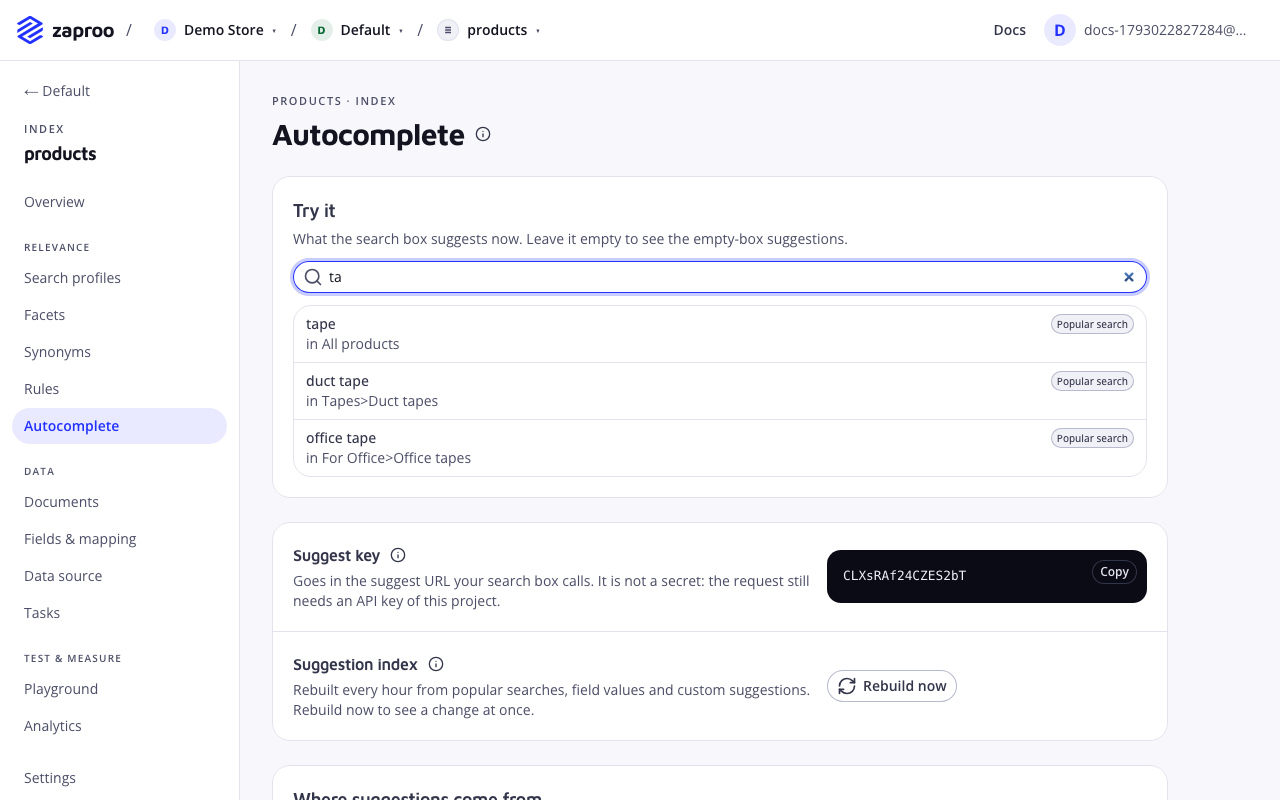
As the shopper types, the search box asks Zaproo for completions: "ta" answers "tape", "duct tape", "office tape". Each index has its own suggestion index, built from three sources:

  • Popular searches: queries that shoppers searched on your store and that found products.
  • Field values of the fields you choose, such as every brand.
  • Custom suggestions you add by hand, such as a campaign name.

Suggestions only ever come from that suggestion index, so a suggest request stays fast and never touches your products. The suggestion index is rebuilt every hour.

To set it up, open an index and click Autocomplete in the menu. Only organization owners and admins can change the settings; other members see them read-only.

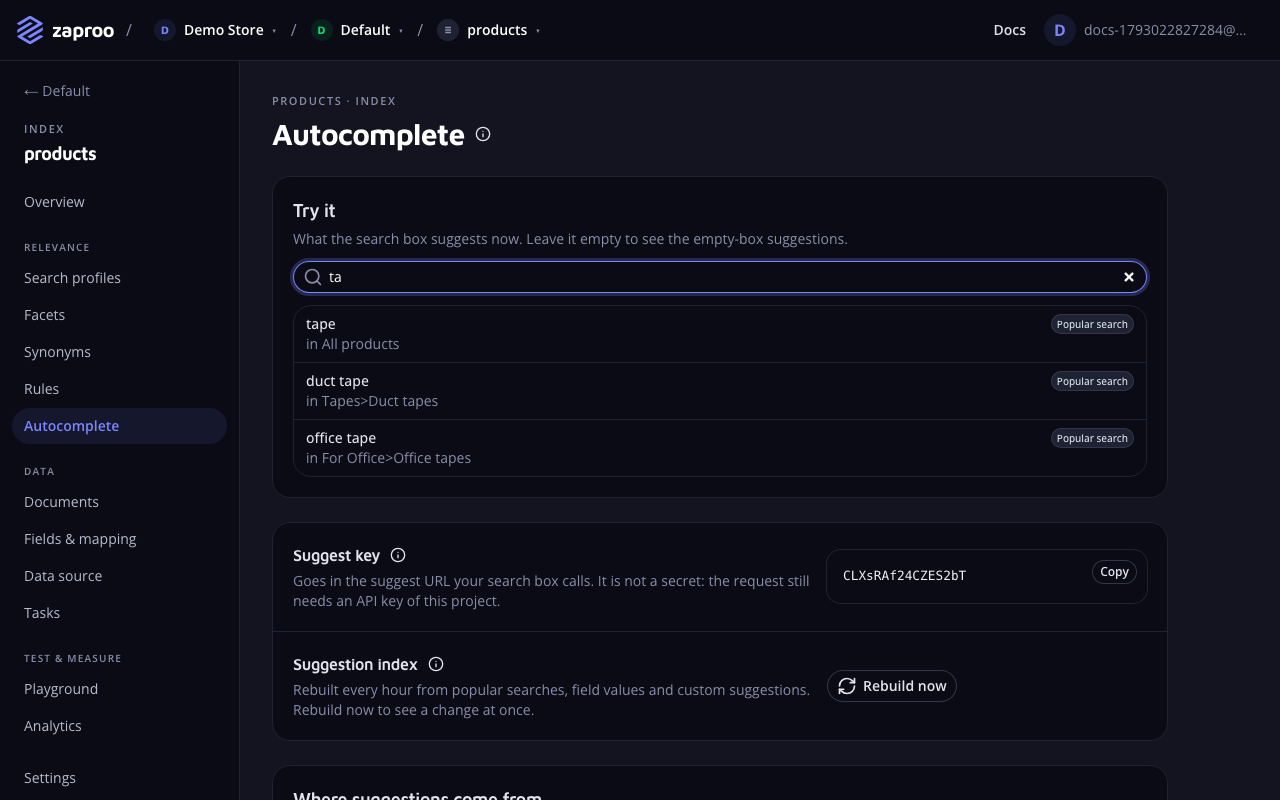
The Autocomplete page of the products index: the Try it panel with the query ta and three popular searches with their categories, then the suggest key and the Rebuild now buttonThe Try it panel shows what the search box suggests now

The page has these parts, in this order:

  1. Try it: what the search box suggests right now.
  2. Suggest key and Suggestion index, with the Rebuild now button.
  3. Where suggestions come from: the settings that shape the build.
  4. How suggestions behave: the settings that shape each answer.
  5. Custom suggestions: the texts you add yourself.

Settings under Where suggestions come from apply with the next build, so click Rebuild now after you save them. Settings under How suggestions behave apply to the very next request.

Try it

Type in the Try it box as a shopper would. The list shows each suggestion with its source (Popular search, Field value or Custom) and, under it, the category it points at, for example "in Tapes>Duct tapes". Leave the box empty to see what a shopper gets on clicking into the search box.

The panel always uses the saved settings. While you have unsaved changes it says so: click Save settings first, and click Rebuild now when the change concerns the sources.

If the list says No suggestions, the suggestion index has not been built since the last change, or none of the sources holds anything yet. See Common mistakes.

Suggest key and suggestion index

Suggest key

suggestKeyType stringValues 16 URL-safe characters, read-only

What it does

The public handle of the index's suggestions. Your search box puts it in the suggest URL. It is created with the index's autocomplete settings and never changes. Copy it from Suggest key at the top of the Autocomplete page.

Best practices and common mistakes

  • The suggest key is not a secret and is no credential. The request still needs an API key of the same project.

Rebuilding

A worker rebuilds the suggestion index of every index that has autocomplete settings once an hour. It reads the popular searches of the lookback window, the values of the chosen fields and the custom suggestions, writes a new suggestion index and swaps it in, so suggest keeps answering during the build. Queries that are a misspelling of a far more popular one ("tpae" next to "tape") are dropped.

Click Rebuild now to see a change at once, for example after you add custom suggestions, change the field list or upload a new catalog. The button starts a task. While it runs, the line next to it shows Rebuild with the task status, and when it is done, how many suggestions the new index holds. The Try it panel then refreshes by itself.

With the API, start a rebuild like this:

POST/v1/projects/:projectId/indices/:indexId/suggestions/rebuildProject admin or a full-access secret key
curl -X POST https://api.search.zaproo.cloud/v1/projects/$PROJECT_ID/indices/$INDEX_ID/suggestions/rebuild \
  -H "Authorization: Bearer $ZS_KEY"
# 202 {"taskId": "..."}

Poll GET /v1/projects/:projectId/tasks/:taskId like any other task. The hourly schedule skips an index whose build is already queued or running. Over MCP, the agent calls rebuild_suggestions.

Where suggestions come from

Three sources are merged. When two of them hold the same text, a custom suggestion wins, then a popular search, then a field value. Change the settings below, click Save settings at the bottom of the form, then Rebuild now.

Queries your shoppers searched that found products. Two settings decide which queries qualify: Searched by at least some number of visitors, In the last some number of days. Only shopper traffic counts: searches from the cabinet, from MCP, from excluded IP addresses, from crawlers and with analytics: false are left out. See What counts as real traffic.

Minimum searches to qualify

minQueryCountType integerDefault 2Values 1 to 1000

What it does

How many different visitors must have searched a query, with results, before it becomes a suggestion. In the cabinet: Searched by at least ... visitors. Each distinct sessionId sent with search counts once; searches without a sessionId count one each.

Best practices and common mistakes

  • Send a stable sessionId with every search from the storefront. Then one shopper who repeats a phrase cannot turn it into a public suggestion.
  • Raise it on a busy store to keep rare or odd queries out. On a new store, 1 or 2 fills the list sooner.

Lookback

lookbackDaysType integerDefault 30Values 1 to 90

What it does

How many days of searches the build reads, 1 to 90. In the cabinet: In the last ... days.

Best practices and common mistakes

  • 30 days follows seasons and trends. A longer window keeps steady sellers but lets last season's queries linger.

Field values

fieldsType field namesDefault []Values up to 10 keyword fields

What it does

Fields whose values become suggestions, such as brand or series. In the cabinet: the Field values list, which offers only the fields that qualify. Each must be a keyword field that is filterable, facetable or sortable in the mapping. Each field adds up to its 200 most frequent values.

Best practices and common mistakes

  • Pick short values that shoppers type by name: brands, product lines, collections. A field like title makes no sense here, because every title would become a suggestion.
  • A field value scores like a query searched about twice, so popular queries rank above it and one-off queries below it.

The last row, Custom suggestions, counts the texts you added and links to the Custom suggestions section below.

How suggestions behave

These settings apply to the next suggest request, without a rebuild. Change them and click Save settings.

Suggestions per answer

limitType integerDefault 8Values 1 to 20

What it does

How many suggestions one answer holds at most. In the cabinet: Suggestions per answer.

Best practices and common mistakes

  • 6 to 8 fit a dropdown on a phone without scrolling. More than 10 is hard to scan while typing.

Empty query suggestions

defaultSuggestionsType { enabled, count }Default enabled true, count 5Values count 1 to 20

What it does

What an empty q answers, for example when the shopper clicks into the search box before typing. With enabled, it lists the count most searched queries. Off, an empty q answers an empty list. In the cabinet: Empty search box, the Show popular searches switch and the number next to it.

Best practices and common mistakes

  • Only popular searches are listed here, never field values or custom suggestions.
  • A new store has no searches yet, so the list stays empty until shoppers have searched for a while.
  • To show products under the popular searches, send a search with an empty q too, and pick the products with an empty-search rule.

Allow one typo per word

fuzzyType booleanDefault true

What it does

Lets each word the shopper types differ by one letter from a suggestion, after an exact first letter: "tpae" still finds "tape". A suggestion that matches without a typo scores twice as high as one that needs the typo, so exact completions come first. In the cabinet: Typos, the Allow one typo per word switch.

Best practices and common mistakes

  • Leave it on for most stores. Turn it off when shoppers mostly type codes, where one changed character is a different product.

Facet hints

facetHintsType booleanDefault true

What it does

Adds a category to suggestions where one stands out: "duct tape" in "Tapes>Duct tapes". The storefront can then search "duct tape" with that category already filtered. In the cabinet: the Show facet hints switch.

A hint comes from the first facetable hierarchy field of the index, and only when more than half of the products the query finds sit in one category; the deepest such category wins. The 200 most popular queries get a hint. With this off, every suggestion answers facetHint: null. Custom suggestions can carry a hint of their own.

Best practices and common mistakes

  • Hints need a hierarchy field that is facetable in the mapping. Without one, queries get no hints, but field values still point at their own field.

Search profile for a clicked suggestion

searchProfileKeyType profile key | nullDefault null

What it does

The profile the storefront should search with when the shopper picks a suggestion. Zaproo does not use it itself. It sends it back in every suggest answer, so the storefront does not have to hard-code it. In the cabinet: Search profile for a clicked suggestion, a list of the index's profiles, or None.

Related

Custom suggestions

A custom suggestion is a text you want offered, with a weight and an optional facet hint. Use it for campaign names, new product lines nobody has searched for yet, or to push one completion above the rest.

To add one, go to Custom suggestions at the bottom of the Autocomplete page:

  1. Enter the Text, for example Black Friday packaging deals.
  2. Set the Weight. The default, 10, ranks above most popular searches. See Weight.
  3. Optionally pick a Facet hint field and enter a Facet hint value, for example categories and Deals.
  4. Click Add. The suggestion appears in the table.
  5. Click Rebuild now at the top of the page. A new or deleted custom suggestion only shows up after the next build.

To delete one, click the bin icon in its row. It is deleted at once, without a confirmation.

With the API or MCP

GET/v1/projects/:projectId/indices/:indexId/suggestions/customProject member or any secret keyPOST/v1/projects/:projectId/indices/:indexId/suggestions/customProject admin or a full-access secret keyDELETE/v1/projects/:projectId/indices/:indexId/suggestions/custom/:suggestionIdProject admin or a full-access secret key
curl -X POST https://api.search.zaproo.cloud/v1/projects/$PROJECT_ID/indices/$INDEX_ID/suggestions/custom \
  -H "Authorization: Bearer $ZS_KEY" -H "Content-Type: application/json" \
  -d '{"text": "black friday packaging deals", "weight": 20, "facetHint": {"key": "categories", "value": "Deals"}}'
text
string required
1 to 100 characters. Unique per index after lowercasing and collapsing spaces, otherwise 409 SUGGESTION_TAKEN.
weight
number required
Above 0, up to 1,000,000. It becomes the suggestion's score as is.
facetHint
{ key, value } | null
The field and value the suggestion points at. Defaults to null.

An index holds up to 1000 custom suggestions; one more answers 409 SUGGESTION_LIMIT_REACHED. MCP has no tool for custom suggestions.

Weight

A popular search scores log1p(searches), the natural log of one plus the number of visitors who searched it. A query searched by 100 visitors scores about 4.6, by 10,000 about 9.2. Your weight is compared with that number directly:

WeightRanks
1Like a field value: above queries searched once, below anything popular.
5Above queries with fewer than about 150 visitors.
10Above queries with fewer than about 22,000 visitors.
15 and aboveAbove every popular search.

When a custom suggestion has the same text as a popular search or a field value, the custom one wins: its weight and its hint are used.

Change the settings with the API

The cabinet's two settings forms are one config per index. The first time anyone opens it, in the cabinet or with GET, it is created with the defaults above and a new suggest key.

GET/v1/projects/:projectId/indices/:indexId/suggestions/configProject member or any secret keyPUT/v1/projects/:projectId/indices/:indexId/suggestions/configProject admin or a full-access secret key

PUT replaces the whole config, so send every setting. A field that is not a keyword field with doc values, or a searchProfileKey that no profile of this index has, answers 400 SUGGEST_CONFIG_INVALID with one issue per problem. MCP has no tool for the config.

curl -X PUT https://api.search.zaproo.cloud/v1/projects/$PROJECT_ID/indices/$INDEX_ID/suggestions/config \
  -H "Authorization: Bearer $ZS_KEY" -H "Content-Type: application/json" \
  -d '{
    "limit": 8,
    "fuzzy": true,
    "defaultSuggestions": {"enabled": true, "count": 5},
    "facetHints": true,
    "searchProfileKey": "PROFILE_KEY",
    "fields": ["brand"],
    "minQueryCount": 2,
    "lookbackDays": 30
  }'

The suggest request

Your storefront calls one route with the suggest key. The body holds only q, up to 100 characters. Integrate a storefront shows how a search box uses it.

POST/v1/suggest/:suggestKeyPublic key from an allowed origin, or a secret key of the same project
curl -X POST https://api.search.zaproo.cloud/v1/suggest/$SUGGEST_KEY \
  -H "Authorization: Bearer $ZS_KEY" -H "Content-Type: application/json" \
  -d '{"q": "ta"}'
{
  "suggestions": [
    {"text": "tape", "kind": "query", "facetHint": {"key": "categories", "value": "Tapes"}},
    {"text": "Packwell", "kind": "field", "facetHint": {"key": "brand", "value": "Packwell"}},
    {"text": "duct tape", "kind": "query", "facetHint": null}
  ],
  "searchProfileKey": "PROFILE_KEY",
  "tookMs": 4
}

A suggest key of another project, or of an index outside the key's index scope, answers 404 SUGGEST_NOT_FOUND. Before the first build, every request answers an empty list. Suggest has its own rate limit, twice that of search, because it fires on every keystroke: 1200 requests a minute per key and 2400 per client IP.

The cabinet's Try it panel uses a second route that takes the index id instead of the suggest key and answers the same:

POST/v1/projects/:projectId/indices/:indexId/suggestProject member or any secret key

Call the public route from the shopper's browser with a public key whose allowed origins list your shop's domains. From a server, use a secret key with read access, scoped to the index: a server sends no Origin header, so a public key answers 403 ORIGIN_NOT_ALLOWED there.

Suggestion kinds

kindShown in Try it asComes fromfacetHint
queryPopular searchA search that shoppers made and that found productsThe category most of its products sit in, when there is one
fieldField valueA value of one of the chosen fieldsThat field and value
customCustomA custom suggestionThe hint you gave it, or null

Popular searches are shown as they are stored, lowercased with spaces collapsed. Field values and custom suggestions keep the spelling you gave them.

Common mistakes

  • No suggestions on a new store. Popular searches need searches first. Add the brand field under Field values and a few custom suggestions, then click Rebuild now.
  • A change to the sources does nothing. Field values, the minimum count, the lookback and custom suggestions only apply with the next build. Click Rebuild now.
  • Test searches on the storefront become suggestions. Searches from the cabinet and from MCP never feed autocomplete, but tests on your live storefront do. Add your office to the excluded IP addresses, keep Searched by at least at 2 or more and send a sessionId from the storefront, so a handful of test searches from one person stays out.
  • Clicks on suggestions don't show in analytics. Suggest requests are not logged. Send suggestion_click events to fill the Autocomplete report.